Use this checklist as a working SOP, not a one-time read.
Each phase builds on the last — skipping ahead to integration before your master data is clean is one of the most common causes of delay.
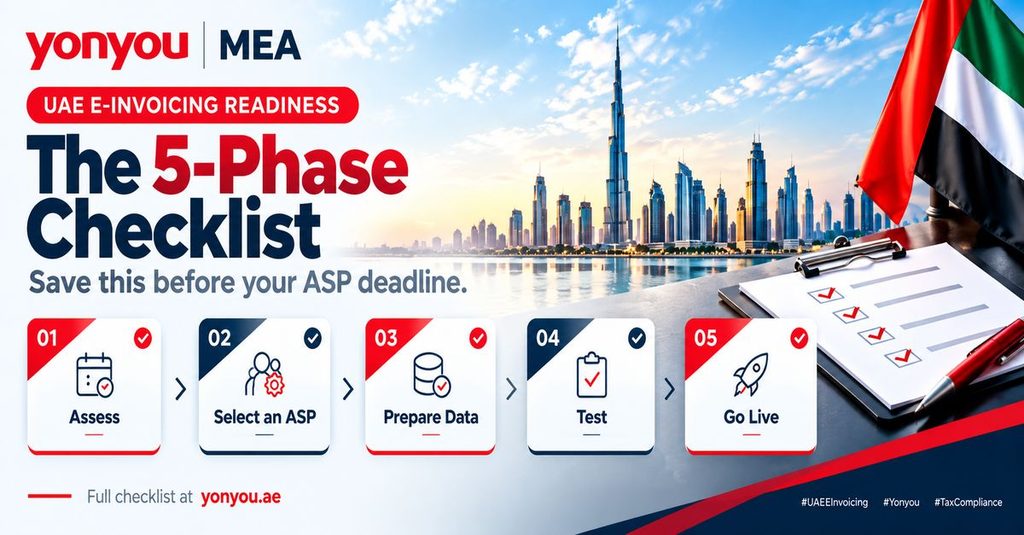
Phase 1: Assess
1. Confirm your revenue tier and golive deadlines
- Identify whether your entity falls into the ≥ AED 50 million or < AED 50 million revenue tier.
- Record your ASP appointment deadline and mandatory golive date (e.g., 1 Jan 2027 or 1 Jul 2027).
2. Map your current invoicing workflow end to end
- Document all steps from order/contract to invoice issuance, delivery, and archiving.
- Highlight any manual or PDFbased steps that will need automation or redesign for structured XML.
3. Identify applicable transaction types
- Confirm which scenarios apply: B2B, B2G, and any specific B2B segments (e.g., crossborder, related parties).
- Note that B2C is currently out of scope for mandatory einvoicing.
4. Assign a single project owner
- Appoint one accountable owner spanning Finance and IT.
- Define a core working group (Finance, IT/Tax, Procurement/Sales) with clear decision rights.
Phase 2: Select and Appoint an ASP
1. Shortlist FTAaccredited providers
Use the official list of preapproved einvoicing service providers:
FTA preapproved einvoicing service providers.
2. Evaluate integration compatibility
- Assess how each ASP integrates with your ERP/accounting system (API, filebased, middleware).
- Confirm support for PINTAE / UBL 2.1, your transaction types, and expected volumes.
3. Compare pricing and budget impact
- Compare fees (setup, perinvoice, support) against your invoice volumes and growth.
- Include ASP costs and internal changemanagement costs in your budget cycle.
4. Sign and complete onboarding early
- Contract and complete technical onboarding well before your ASP deadline, not on the due date.
- Ensure your ASP is formally appointed in line with MoF/FTA requirements.
Phase 3: Prepare Your Data and Systems
1. Clean and standardise master data
- Tax codes / VAT treatment: Standardise tax codes and map them to PINTAE tax categories (standard, zerorated, exempt, outofscope).
- Customer and supplier records: Ensure complete and accurate legal names, TRNs, addresses, and country codes.
- Peppol participant IDs: Capture and validate Peppol endpoint IDs where available; maintain a “Peppol ID registry” with verification dates.
2. Map ERP invoice fields to PINTAE / UBL 2.1
- Use MoF’s mandatory fields list and the PINTAE / UBL 2.1 schema as your data dictionary.
- Create and maintain a fieldbyfield mapping from your ERP to PINTAE elements (document type, parties, line items, taxes, payments, references).
- Validate that all mandatory and conditional fields are correctly populated for each transaction type.
3. Confirm secure storage and retention meets FTA requirements
- Retain einvoices and related data in structured format (XML/JSON) for at least *5 years* from the end of the relevant tax period.
- Ensure records are stored securely, with integrity controls and the ability to retrieve them promptly for FTA requests.
- Clarify storage responsibilities with your ASP/cloud provider; your entity remains legally responsible for compliance.
4. Identify trading partners without a Peppol ID and plan fallback
- Run a gap analysis of key customers and suppliers to identify those without Peppol IDs.
- Define fallback procedures (e.g., email/portal delivery of commercial copy while still generating compliant PINTAE XML and reporting via your ASP).
- Document a communication plan to inform partners of your golive date, data requirements, and interim processes.
Phase 4: Test the Full Chain
1. Execute endtoend test invoices
Generate test invoices in your ERP and route them through:
- Invoice generation
- ASP validation
- Peppol transmission
- Buyer receipt and acceptance
Cover all relevant scenarios (B2B, B2G, advances, credit notes, retentions, exports where applicable).
2. Log and resolve validation errors during pilot
- Use the voluntary pilot phase to identify and fix schema, mapping, and process errors while no penalties apply.
- Maintain an error log with root cause, fix, and owner.
3. Run a parallel period before cutover
- Operate einvoicing in parallel with your legacy process for a defined period.
- Reconcile einvoice data with VAT reporting and financials before full cutover.
Phase 5: Go Live and Monitor
1. Confirm golive ahead of your mandatory date
- Target an internal golive date that allows buffer time before your regulatory deadline.
- Obtain formal signoff from Finance and IT that key controls are working.
2. Set up monitoring and alerts
- Configure alerts for transmission failures, rejected invoices, and ASP service issues.
- Assign an owner to monitor and resolve failures within defined service level agreements (SLAs).
3. Track FTA systemfailure notifications
- Monitor any FTA/MoF communications regarding system outages or temporary relief.
- Assign an owner to track these notifications and adjust internal processes accordingly.
4. Review performance post golive
For the first two quarters after golive, review monthly:
- Rejection and error rates
- Average resolution time for failures
- Any recurring dataquality or mapping issues
Use findings to refine master data, workflows, and training.